I have always wanted to keep an active and up-to-date to-do list and be always reminded of the things I have to do. There are lots of choices out there, but I wanted to stick to simple commandline driven tools to keep from wasting valuable RAM on non-critical utilities. After a few hours of playing around, here is the solution I have adapted.
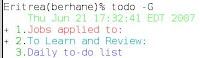 I use 'todo' to make a list of my tasks. 'todo' is a reminder/task program aimed at developersis, but it is very easy to use and has a good set of features. For our purposes, we can generate the list shown below by simply entering the following commands:
I want my extended to-do list to hit me in the face every hour -- that's the only way I would feel guilty enough to work hard. So, we are going to need some graphical tool to announce my to-do list as frequently as possible. After looking through a few options, I chose 'gmessage' as that graphical tool. Of course, I will setup a 'crontab' to call 'gmessage'.
 A constant reminder like this should keep your responsibilities in the foreground and minimize the slacking off you would engage in otherwise.
Todo/devtodo
 I use 'todo' to make a list of my tasks. 'todo' is a reminder/task program aimed at developersis, but it is very easy to use and has a good set of features. For our purposes, we can generate the list shown below by simply entering the following commands:
todo -G -a "Jobs applied to:" -p 1If you enter, 'todo', it will list your to-do list. Feel free to explore more of 'todo', but the example above suffices for out little demo.
todo -G -a "To Learn and Review:" -p 3
todo -G -a "Daily to-do list" -p 5
I want my extended to-do list to hit me in the face every hour -- that's the only way I would feel guilty enough to work hard. So, we are going to need some graphical tool to announce my to-do list as frequently as possible. After looking through a few options, I chose 'gmessage' as that graphical tool. Of course, I will setup a 'crontab' to call 'gmessage'.
Script + gmessage
I wrote this script into a file called '~/bin/message'#!/usr/bin/tcshThe most important part part here is to specify -display :0, or whatever the output of your 'echo $DISPLAY' is, because it is essential if we are to use cron to run this script.
date > ~/.message
todo --all >> ~/.message
gmessage -center -font "Sans Serif Bold 10" -display :0 -file ~/.message
Crontab
To run the script '~/bin/message' every hour at the half hour mark, we can create add cron job to our crontab by running 'crontab -e' and adding this line:# m h dom mon dow commandThe result of this endeavor is:
30 * * * * ~/bin/message
 A constant reminder like this should keep your responsibilities in the foreground and minimize the slacking off you would engage in otherwise.
Comments